27 October, 2015

Websites with a Construction Theme - Home and Away

Two of the websites created for clients and launched this month feature brand new homes. Our most recently released client site showcases a number of luxury build-to-order contemporary style designer villas near the Mediterranean sea.


Designer Villa interior
Between Valencia and Alicante on the Costa Blanca, spacious three and four bedroom Designer Villas are offered on residential plots of (typically) 800 square metres / one-fifth of a acre, including a private swimming pool. With prices much lower than similar property in the UK, the website is aimed at couples and families looking for a more relaxed lifestyle, either as a holiday home or a permanent residence, in a milder winter climate. The villas are also a good investment opportunity.

A few days earlier, we published a corporate website for a Bedfordshire-based construction company, Roseground Ltd.
Their construction and refurbishment services include Cleanrooms, Secure areas, offices, canteens, reception areas and infrastructures.
Roseground also built executive homes at Sundon Park.

The BPc uses WordPress themes to create websites for clients who then have the option of managing their own website content and basic SEO, with a little training and support. Alternatively, website management can be undertaken by The BPc or another third party familiar with the WordPress concept. We also offer support services, including logo design, social media management, etc. Let us know if you'd like assistance with your website promotion or internet presence.

18 September, 2015

Guest or Ghost Writing Articles and Blog Posts

Ghosts backdrop, courtesy of www.Novelties-Direct.com
One of our popular services at The BPc is blog writing. This began with a number of Google blogger accounts for various clients, many of which have been migrated to or superseded by integrated blog posts on WordPress-based websites, some of which we've developed ourselves (see Recently Built and Delivered Client Websites).

In addition to keeping our clients' blogs up to date, we also write articles and posts for publication elsewhere; sometimes as a guest writer and sometimes as a ghost writer. Recently, we wrote a business tips feature with a client, which was published by The British Library.

The purpose of Blogs and Articles


There are two reasons to write blogs and articles: Potential customers & Google.

As long as they are interesting, blog posts on your own website can attract and maintain visitors. If they like what you write, they may recommend you or use your product or service. More traffic is interesting to Google and may help your ranking in their Search Results.

Also of interest to Google is 'quality' content. Google defines quality in many mysterious ways which include:
  • number of visitors and length of visit
  • length of post or article (300+ words is their suggested minimum)
  • images with alt-tags and, preferably, height/width details
  • off-site links - but not too many - to related content
Google will analyse your content for keyword stuffing and duplication so DO NOT copy/paste paragraphs of information from elsewhere on the internet - Google algorithms will determine that your post has nothing to offer and it may even impact the value of your whole website.

How to keep coming up with fresh content for your posts


First of all, determine the frequency of posting: one new post every month is better than posting a few all at once then leaving a long gap. Both Blogger and WordPress allow you to schedule your posts. As an aside, you can also schedule your Facebook Business Page posts.

Often, business owners are so used to just getting on with the job that they can't see how any of it can be used to create a 300-word newsworthy item. It may be 'old hat' to you but the rest of the world hasn't heard it yet therefore it's news. An outsider is often the best person to tell you what may be newsworthy.

For example, if your business is erecting flagpoles, what might your blog post schedule look like?
  1. Company History
  2. How to erect different style flag poles
  3. Major order for 1200 flagpoles nationwide
  4. Erected some more flagpoles
... then you run out of news until Christmas. Dull as dishwater! Try this:
  1. Inspired to set up our flagpole services business
  2. If anyone can erect a flagpole, why is our business so successful?
  3. 1200 new flagpoles nationwide - find out where and why!
  4. Corporate flagpoles in Stevenage and Bath
  5. Do you recognise these London landmarks where our flagpoles are sited?
Item 4 may seem a bit pointless but not to companies searching those keywords!! Not only is mentioning place names linked to your service good for searches but mentioning your clients means that they are likely to assist your publicity plans, e.g. with retweets on Twitter. Item 5 is a twist on the same theme, using location keywords and uploading some photos to make it interesting.

If it's a bit of a chore and you'd like The BPc to help, let us know! Find us on Twitter.com/BPcUK


23 July, 2015

Recently Built & Delivered Client Websites

Here are some websites we've delivered since our previous websites-now-live post.


Logos from Websites

Hanson Catering has followed their strategy of continued service excellence during controlled growth. They were being hampered by their previous website which was out of date in a number of ways including the technology used to build it and the method of updating the content to keep it fresh. It was difficult and time-consuming to introduce new menus onto the website - but not now! The BPc won the bid to develop a website that reflects the company's style and provides a showcase for their services.

With so many menu choices on offer, we chose a picture-based menu system. It's also quite rare that a company displays its prices for fear of competitors under-cutting them but Hansons' know that their prices are value for money and that customers need to know such information quickly, not have to wait for a quote just to allocate a budget. Hansons welcome enquiries via the website or by 'phone so don't hesitate if you would like to contact them.

Hansons provide catering services in Herts and the North-West regions of the London catchment area, for businesses, weddings and other private functions, from intimate gatherings to hundreds of guests. Ready to see their website now? Click the link below the image to visit...

www.hansoncatering.co.uk - website
www.hansoncatering.co.uk

We have re-designed the SunSeeker Doors website for the third time in the company's history. As a company at the forefront of technology in their field of door design, SunSeeker Doors' management fully understands the need for their website technology to reflect that ethos, without splashing out mega-bucks for no good reason. SunSeeker has been manufacturing and installing bi folding doors for most of this century and is leading the way with their new UltraSlim range of bi folds and sliding pivot door systems.

Often, the doors are fitted during property renovations and photographs taken at the time tend to show builders' rubble - but they've managed to obtain some great photos in recent months, thanks to their clients, and these can be seen on the gallery page.

We decided to use a mega-menu with images of the products because some of the door names or descriptions are not very helpful for browsing around, e.g. UltraSlim Bi Folds, UltraSlim Slide-Pivot, Frameless Double-Glazed... a picture is indeed worth a thousand words. Without further ado, here is a snapshot of the website with a link to the real thing:

website for sunseekerdoors.co.uk
www.sunseekerdoors.co.uk

Our client in Provence expanded their holiday business earlier this year and asked us to completely re-design their website to include their latest venture - classic VW Campervan holiday hire for people who want to tour without the bother of planning hotel stop-overs. The SunHatFrance website was several years old and was in need of some energising so we updated the logo while the client supplied some fantastic photographs and wrote some blog posts, describing some of the best places to visit whilst touring in the Côte d'Azur. Then we built the website, which includes an online availability calendar and provisional booking system.

SunHatFrance is owned by an English couple who have run a holiday business in the South of France for many years, with repeat business from many clients. They have invested in two campervans, Cassie & Joe, so that holiday-makers may tour the area, enjoying not only popular venues but also explore those out-of-the-way places without having to commit to a schedule.

Once again, strong images have been used to complement the written descriptions, conveying the idyllic holiday life in the South of France.

website design for www.sunhatfrance.com
www.sunhatfrance.com

A Hertfordshire Company asked us to build a new website for them as we had previously created two other websites for previous ventures and they were pleased with our services. The client is very 'hands on'  therefore we were training as we built the site. It worked well:

www.millerspropertyservices.com website design
www.millerspropertyservices.com


The Welwyn Festival Group wanted to replace their blog with an engaging website with the ability to become all-singing, all-dancing and which could be updated reasonably easily by computer literate volunteers. The site needs to be informative, attractive to a community of mixed age groups and updateable quickly and easily.

They have a huge number of photographs dating back over 15 years and some further back still, not all of sufficient quality for the website, but many will nevertheless be uploaded as an archive record. We set up the new website with a handful of more recent photographs in time for the annual festival. The next few months will see some training sessions and we have agreed to support the efforts of this charitable organisation for at least the next year.

The emphasis for this site is on fun! We have uploaded some photographs of this summer's week-long festival and the Welwyn Festival group will upload more following training.

www.welwynfestivalgroup.org.uk website design
www.welwynfestivalgroup.org.uk
The green background images are on a mega-menu which drops down over the page header image. Each of the items is linkable to the latest news and 'next' will present the previous news - and so on. There is a main menu bar and sub-menu at the top of the page tp help people using the site to find the information they are interested in. Navigation is no mean feat as there are 70-ish events each year.

Please visit each of these websites and order some party food and sleek new doors, book a relaxing holiday in France or contact us with your website questions. You'll find us on Twitter/BPcUK.


02 April, 2015

Google's Deadline for Mobile-Friendly Websites - Are You Ready?

Is your website 'mobile-friendly'?

Google has set a deadline of April 21st for websites to become mobile-friendly. If, after this date, your website fails Google's mobile-friendly test then it will begin to slide way down their organic search results ranking for mobile searches.

Isn't Google meant to deliver these results in an un-biased fashion based on relevance and popularity? It doesn't matter, Google will do whatever it wants and our job is to obey. So what is it that website owners of small businesses need to do?

Test Your Website for Mobile-Friendliness


Use this link to find out the results: www.google.com/webmasters/tools/mobile-friendly/

If your website passes the test, you don't need to read the rest of this post. Enjoy the rest of your day!

If your website fails, there may be a couple or more reasons cited. Before you panic, though, how important is the result to you? Google isn't very clear on this but it is generally thought that, currently, it will only affect your results position for searches on mobiles and that your position should remain fairly consistent on desktop computer services and probably tablets.

Use Google Analytics to Determine the Urgency


If you have access to your website's Google Analytics, you will be able to find out what percentage of your visitors are using mobiles to find your website.

If it's around 10%-12% like this, you have a little time to think about your strategy

But if it's 25%-30% like this, you will need to make some quick decisions!

If the phrase 'Google Analytics' means nothing to you, contact your web people immediately for help. If that is difficult for you, email us with your website address and we'll (1) see if you have analytics in place and (2) try to give best advice, briefly, without charge or further obligation.


Winners & Losers

WordPress
If your website was developed using a WordPress theme within the past year, it is quite possible that it has a responsive theme and will pass the test; if it is a non-responsive WordPress site, it may be a case of transferring to another theme. Sometimes, though, it's quicker (and therefore cheaper) to start again.

HTML hand-coded sites
These are unlikely to be responsive but your website developer may be able to use CSS to make it responsive.

Other CMS & e-commerce sites
Sorry but I don't feel qualified to comment as expertise here is limited.

Other options
Rather than rewrite a site, it may be possible to code a mobile-friendly version. Your website developer will be able to explain this to you.

One more thing... Act Now! If you need help, advice or maybe a new website, let us know.


02 March, 2015

Dear Daily.co.uk - That is NOT the way to treat your customers!

I thought it important to squeeze in a little rant about the company we've used since just after it launched - we even mentioned daily.co.uk in a blog post 3 or 4 years ago. We were impressed with the service to begin with and were comfortable enough to remain with them as their services deteriorated - but these last few days has sealed the fate of any future relationship. We no longer trust them to respect their customers.

Last Friday, we were asked to register a domainname.co.uk for a client and logged into daily.co.uk as usual to do so. As we were choosing the length of registration, we noticed what we thought were pricing errors - an increase in excess of 50% to register a .co.uk domain for 2 years.

We then checked the price of our upcoming renewals of some daily-previously registered .co.uk domains that are due in a couple of months: it showed the same price hike.

We searched online forums to find that others were equally shocked at daily's sudden price rise.

So, in the same way that we transferred a load of domains to them over the past few years, we decided to begin transferring away and were stunned to discover that they had anticipated this action and have added a charge for this previously (and generally) free service!

Here are the sums:

You can register/renew.co.uk domains for up to ten years with most reputable companies. Using the figures in the illustration above, the savings for transferring away would be even greater for each added year.

No prizes for guessing what we're doing. In fact, shopping around for cheaper domain names can save even more money but we have to consider other aspects that are important to the way we work with our clients.

For example, at the time of writing, Heart Internet is £5.98+vat for 2 years registration/renewal and, if you are willing to pay in Euros, Blacknight.com charges €7.98+vat for 2 years .co.uk registration/renewal which is (today) approximately £5.82+vat. Disclaimer: please check the prices and services for yourself before proceeding as we will not be held responsible for the consequences of any action taken, citing this blog.

In the interests of balance, we should add that if you wish to pre-pay for at least 150 .co.uk domain names with daily.co.uk, the price does come down to £5.30+vat for 2 years' registration/renewal.


08 December, 2014

SEO for Websites - the basics - in plain English.

SEO stands for Search Engine Optimisation - but what does this really mean?

Google is a search engine. It is not the only search engine, Bing (from Microsoft) is its main competitor, but Google is used by more than 90 per cent of the western world to search for information on the internet.

A search engine is not the same as a browser. The most popular browsers are: Internet Explorer (from Microsoft), Safari (from Apple, mostly used on Apple computers and devices), Chrome (from Google) and Firefox (from Mozilla). Your browser is your "window" to the internet; it enables you to view websites, including social media, and to use search engines.

A search engine provides a way of finding information that is stored somewhere on the internet.

Twitter shown in Firefox browser

The images above show a browser (the tabs, boxes and quick links across the top) displaying Google search results in the first image and a Twitter page in the second image. Twitter, Facebook, Amazon and other websites may all be listed in Google's search results and can be reached by clicking the links or by putting the appropriate link/website address directly into the box at the top of the browser.


Why website owners need SEO

There are millions of websites on the internet. Anyone who knows your website address (also known as domain name or URL*) can type it into a browser and see your website. Other visitors will need to have your website brought to their attention. This could be via another website or social media but the largest audience can be reached by ranking well in Google search results.

Google uses a variety of data to determine who should be on page 1 of their results, including:
  • close match of the search term (keyword or phrase) with your website content and how much importance the term has in relation to other content on your website;
  • how many links go to your website from other sites using similar terminology;
  • how many visitors land on your pages and how long they stay on your site;
  • uniqueness of quality content (if most of the phrases are already found elsewhere on the web, don't duplicate);
  • site history and frequency of content updates;
  • speed of website, quality of code and 'meta-data' (two of the important meta-data are page title and description, read on...)
Meta-data and code structure are what the search engine sees. Ideally, it should be 'search engine friendly' when your website is delivered to you, so check what aspects of SEO are covered in the quotation. If you have a CMS-based website (Content Management System) that enables you to update website content yourself, you are likely to also have access to other areas to improve SEO yourself, including the ability to change meta-data. If you don't have the expertise, please seek assistance or training.

Ask yourself: Of the millions of websites in the world, why should yours be on page 1 of Google results? When you know the reasons, you will be on your way there!


Start-up? Use this Guide


Step 1. Find a competent website builder who will advise you of the things you need to consider. It would be useful if he/she understands the importance of SEO and will cater for this in some way (you would be surprised how many don't).

Step 2. We suggest using WordPress to build an easy to maintain website. If your designer says otherwise, make sure that you understand and believe his/her reasons.

Note. If you require an e-commerce package for an on-line shop, be aware that these can be very complicated and time consuming for a small business with a lack of appropriate skills. Take time to learn the correct set up for uploading and maintaining products and be aware of the SEO implications.

Step 3. Choose a website design that reflects your company image.

Step 4. Ensure that you understand the importance of SEO and do not neglect it.

Best of luck! Let us know if you'd like our help. Now, If you're ready for something a bit more technical, here is a previous article we posted on optimisation and images.

*acronym for Uniform Resource Locator

21 November, 2014

Adding interest with a Pinterest widget!

Liven up your blog or a page of your website with a Pinterest widget like this!


It's a dynamic link so it may take an extra second to load but it will display your latest Pins with a link to your Pinterest account for readers to browse through more of your images, recipes, videos, etc.

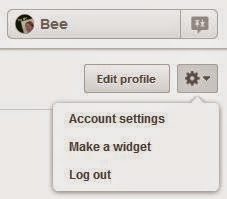
To showcase your Pins, log in to your Pinterest account and use the drop-down menu at the top right; click on Make a widget, as shown in the screen capture snippet on the right.

You are then provided with a couple of lines html code that can be inserted into the html of your website or blog.

If you know html, this code is customisable to be wider, shorter, taller or thinner but if you haven't a clue what html is or where to find it, read on...

Google Blogger/Blogspot: there is a choice of Compose or HTML button above the content area of your post, to the left. Use the HTML button to paste the code then return to Compose mode to complete your post.

WordPress Blog: There is a choice of Visual or Text tab immediately above-right of the content panel. Use the Text button to paste the code then return to Visual mode to complete your post.

WordPress Website: follow the instructions for WordPress Blog or - depending on your theme - you may be able to paste into a widget area.

Other CMS Websites will have similar means of switching between HTML and WYSIWYG. You may need to contect your website designer for instructions.

HTML-coded Website: Unless you have the appropriate development tools and skills, you will need to refer to your website designer.

Visit Bee's profile on Pinterest.

Customising the size: keep the original Pinterest code so that you can re-insert it if necessary.
In HTML/Text mode, you may find the following numbers in the html:
" data-pin-board-width="400" data-pin-scale-height="200" data-pin-scale-width="80" "
and play around with them until you are happy with the result, e.g.
" data-pin-board-width="695" data-pin-scale-height="133" data-pin-scale-width="78" "

Have fun pinning and showing off your new skills!